

 Posted by
 Introduction
As organizations increasingly move to the cloud, securing connectivity between resources becomes critical. Traditional models of accessing Azure services over public endpoints can expose organizations to various security threats, including data exfiltration and unauthorized access.
Enter Azure Private Endpoints—a powerful feature that allows secure and private access to Azure services over a private IP address within your Virtual Network (VNet), eliminating exposure to the public internet.
What Are Azure Private Endpoints?
An Azure Private Endpoint is a network interface that connects you privately and securely to a service powered by Azure Private Link. It uses a private IP address from your VNet, effectively bringing the Azure service into your private network.
Key Points:
- It maps a private IP from your VNet to an Azure resource (e.g., Blob Storage, SQL Database).
- All traffic to the service traverses the Microsoft backbone network, not the public internet.
- You can apply NSGs (Network Security Groups) and firewall rules to control access.
Why Do We Need Private Endpoints?
Here’s why organizations adopt Private Endpoints:
1. Enhanced Security
- Removes exposure of Azure PaaS services (like Azure Storage, Azure SQL, etc.) to the public internet.
- Protects against data exfiltration and man-in-the-middle attacks.
2. Access Control
- You can control access via NSGs, Azure Firewall, and custom routing.
- Enables segmentation within your environment.
3. Compliance
- Helps meet regulatory and compliance needs by ensuring traffic stays within private IP spaces.
4. No Internet Dependency
- Even if internet access is cut off, your private endpoint traffic continues to work as it’s within the Azure backbone.
Services Supported by Private Endpoints
Some commonly used Azure services that support Private Endpoints:
- Azure Storage (Blob/File/Table/Queue)
- Azure SQL Database
- Azure Cosmos DB
- Azure Web Apps (App Services)
- Azure Key Vault
- Azure Container Registry
- Azure Backup, and more…
Architecture Diagram
Here’s a visual representation of how Private Endpoints work:

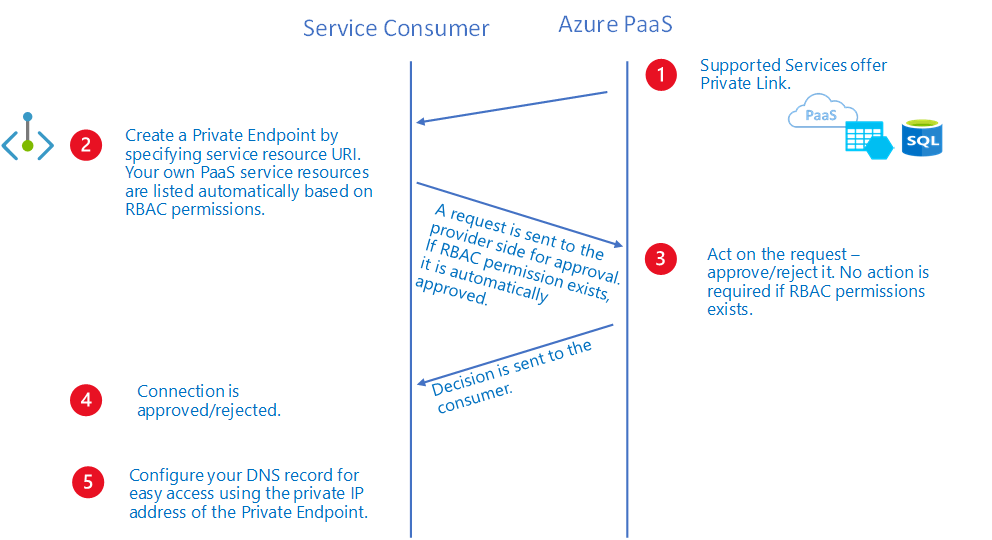
Explanation:
- A Private Endpoint in the VNet gets a private IP.
- It connects to the Azure service over the Microsoft backbone.
- The traffic stays within the private Azure network, not routed via the public internet.
How to Implement a Private Endpoint
Let’s walk through how to implement a Private Endpoint for Azure Blob Storage.
Prerequisites:
- An existing Virtual Network and Subnet.
- A Storage Account created in Azure.
- Necessary permissions (Owner or Network Contributor roles).
Step-by-Step: Create a Private Endpoint
Step 1: Open the Storage Account
- Go to Azure Portal > Your Storage Account
- Under Networking, select Private endpoint connections
Step 2: Create a New Private Endpoint
- Click + Private endpoint
- Provide:
- Name
- Region (should match your VNet region)
Step 3: Resource Details
- Choose the resource type (Microsoft.Storage/storageAccounts)
- Select your Storage Account
Step 4: Configure Virtual Network
- Choose your VNet and subnet
- Optionally configure Private DNS integration
Step 5: DNS Settings
- Integrate with Private DNS Zone (e.g.,
privatelink.blob.core.windows.net) - Azure will automatically create DNS records for name resolution.
Step 6: Review + Create
- Review configuration and click Create
Done! You now have a Private Endpoint for your Azure Blob Storage.
Testing the Private Endpoint
You can test access using a VM in the same VNet:
nslookup yourstorageaccount.blob.core.windows.netYou should see something like:
Name:    yourstorageaccount.privatelink.blob.core.windows.net
Address: 10.x.x.x
This confirms traffic is resolving to a private IP, not the public one.
Using Private DNS Zones (Optional but Recommended)
Azure automatically integrates Private Endpoints with Private DNS Zones (e.g., privatelink.database.windows.net) to ensure name resolution happens within your VNet.
Benefits:
- No need to manually update DNS.
- Automatically works for other resources in the same VNet or peered VNets.
Controlling Access with NSGs and Firewalls
Although Private Endpoints offer private connectivity, you still need to restrict access further using:
- NSGs on the subnet where the private endpoint is connected.
- Firewall rules on the service itself to allow only private endpoint access.
Example:
- Deny all public access to the Storage Account.
- Allow only traffic via the Private Endpoint.
Common Pitfalls to Avoid
- DNS misconfiguration: If your DNS isn’t set up properly, the service might still resolve to its public IP.
- Service firewall not updated: If the target Azure service firewall blocks private endpoint traffic, connectivity fails.
- Wrong subnet: Make sure the subnet is not delegated to conflicting services.
Real-World Use Case
Scenario: A healthcare company wants to securely access Azure SQL Database from their Azure VNet without exposing the database to the internet.
Solution:
- Create a Private Endpoint for the SQL DB.
- Disable public access on the SQL firewall.
- Use Private DNS to ensure correct name resolution.
- Control access using NSGs.
Result: Completely secure, private access to SQL DB—no public exposure.
Scenario: Create a Private Endpoint for Azure Storage Account
Resources Included:
- Virtual Network
- Subnet
- Storage Account
- Private Endpoint
- Private DNS Zone
- Private DNS Zone Group (to link the DNS zone to the private endpoint)
Bicep Template
param location string = resourceGroup().location
param vnetName string = 'myVnet'
param subnetName string = 'mySubnet'
param storageAccountName string = 'mystorageacct12345'
param privateEndpointName string = 'pe-storage'
param dnsZoneName string = 'privatelink.blob.core.windows.net'

resource vnet 'Microsoft.Network/virtualNetworks@2023-02-01' = {
  name: vnetName
  location: location
  properties: {
    addressSpace: {
      addressPrefixes: [
        '10.0.0.0/16'
      ]
    }
    subnets: [
      {
        name: subnetName
        properties: {
          addressPrefix: '10.0.0.0/24'
        }
      }
    ]
  }
}

resource storageAccount 'Microsoft.Storage/storageAccounts@2023-01-01' = {
  name: storageAccountName
  location: location
  sku: {
    name: 'Standard_LRS'
  }
  kind: 'StorageV2'
  properties: {
    accessTier: 'Hot'
  }
}

resource privateDnsZone 'Microsoft.Network/privateDnsZones@2020-06-01' = {
  name: dnsZoneName
  location: 'global'
}

resource vnetLink 'Microsoft.Network/privateDnsZones/virtualNetworkLinks@2020-06-01' = {
  name: 'dnsLink-${vnet.name}'
  parent: privateDnsZone
  location: 'global'
  properties: {
    virtualNetwork: {
      id: vnet.id
    }
    registrationEnabled: false
  }
}

resource privateEndpoint 'Microsoft.Network/privateEndpoints@2023-02-01' = {
  name: privateEndpointName
  location: location
  properties: {
    subnet: {
      id: vnet.properties.subnets[0].id
    }
    privateLinkServiceConnections: [
      {
        name: '${privateEndpointName}-link'
        properties: {
          privateLinkServiceId: storageAccount.id
          groupIds: [
            'blob'
          ]
        }
      }
    ]
  }
}

resource privateDnsZoneGroup 'Microsoft.Network/privateEndpoints/privateDnsZoneGroups@2022-09-01' = {
  name: 'default'
  parent: privateEndpoint
  properties: {
    privateDnsZoneConfigs: [
      {
        name: 'config'
        properties: {
          privateDnsZoneId: privateDnsZone.id
        }
      }
    ]
  }
}
ARM Template (JSON)
{
  "$schema": "https://schema.management.azure.com/schemas/2019-04-01/deploymentTemplate.json#",
  "contentVersion": "1.0.0.0",
  "parameters": {
    "location": { "type": "string", "defaultValue": "[resourceGroup().location]" },
    "vnetName": { "type": "string", "defaultValue": "myVnet" },
    "subnetName": { "type": "string", "defaultValue": "mySubnet" },
    "storageAccountName": { "type": "string" },
    "privateEndpointName": { "type": "string", "defaultValue": "pe-storage" }
  },
  "resources": [
    {
      "type": "Microsoft.Network/virtualNetworks",
      "apiVersion": "2023-02-01",
      "name": "[parameters('vnetName')]",
      "location": "[parameters('location')]",
      "properties": {
        "addressSpace": {
          "addressPrefixes": ["10.0.0.0/16"]
        },
        "subnets": [
          {
            "name": "[parameters('subnetName')]",
            "properties": {
              "addressPrefix": "10.0.0.0/24"
            }
          }
        ]
      }
    },
    {
      "type": "Microsoft.Storage/storageAccounts",
      "apiVersion": "2023-01-01",
      "name": "[parameters('storageAccountName')]",
      "location": "[parameters('location')]",
      "sku": { "name": "Standard_LRS" },
      "kind": "StorageV2",
      "properties": {
        "accessTier": "Hot"
      }
    },
    {
      "type": "Microsoft.Network/privateDnsZones",
      "apiVersion": "2020-06-01",
      "name": "privatelink.blob.core.windows.net",
      "location": "global",
      "properties": {}
    },
    {
      "type": "Microsoft.Network/privateDnsZones/virtualNetworkLinks",
      "apiVersion": "2020-06-01",
      "name": "[concat('dnsLink-', parameters('vnetName'))]",
      "dependsOn": ["Microsoft.Network/privateDnsZones/privatelink.blob.core.windows.net"],
      "location": "global",
      "properties": {
        "virtualNetwork": {
          "id": "[resourceId('Microsoft.Network/virtualNetworks', parameters('vnetName'))]"
        },
        "registrationEnabled": false
      }
    },
    {
      "type": "Microsoft.Network/privateEndpoints",
      "apiVersion": "2023-02-01",
      "name": "[parameters('privateEndpointName')]",
      "location": "[parameters('location')]",
      "dependsOn": [
        "[resourceId('Microsoft.Storage/storageAccounts', parameters('storageAccountName'))]",
        "[resourceId('Microsoft.Network/virtualNetworks', parameters('vnetName'))]"
      ],
      "properties": {
        "subnet": {
          "id": "[resourceId('Microsoft.Network/virtualNetworks/subnets', parameters('vnetName'), parameters('subnetName'))]"
        },
        "privateLinkServiceConnections": [
          {
            "name": "[concat(parameters('privateEndpointName'), '-link')]",
            "properties": {
              "privateLinkServiceId": "[resourceId('Microsoft.Storage/storageAccounts', parameters('storageAccountName'))]",
              "groupIds": ["blob"]
            }
          }
        ]
      }
    },
    {
      "type": "Microsoft.Network/privateEndpoints/privateDnsZoneGroups",
      "apiVersion": "2022-09-01",
      "name": "default",
      "dependsOn": ["Microsoft.Network/privateEndpoints/[parameters('privateEndpointName')]"],
      "properties": {
        "privateDnsZoneConfigs": [
          {
            "name": "config",
            "properties": {
              "privateDnsZoneId": "[resourceId('Microsoft.Network/privateDnsZones', 'privatelink.blob.core.windows.net')]"
            }
          }
        ]
      }
    }
  ]
}
Deployment Instructions
Deploy Bicep via Azure CLI:
az deployment group create \
  --resource-group myResourceGroup \
  --template-file private-endpoint.bicep \
  --parameters storageAccountName=mystorageacct12345
Deploy ARM via Azure CLI:
az deployment group create \
  --resource-group myResourceGroup \
  --template-file private-endpoint-arm.json \
  --parameters storageAccountName=mystorageacct12345
Conclusion
Azure Private Endpoints are a critical security measure that allows you to access Azure services privately and securely. By bringing services into your VNet via private IPs, you eliminate the risks associated with public endpoints and gain granular control over your traffic.
Use them to:
- Secure your Azure services
- Eliminate internet exposure
- Comply with internal and external security policies
References & Learn More
- Azure Private Endpoint documentation
- Private Link DNS Integration
- Secure Azure Storage with Private Endpoints
 Code Teddy